Snort Sorun Giderme Klavuzu
Snort IDS/IPS/ADS yazılımının bir çok linux ve *BSD dağıtımı için hali hazırda derlenmiş sürümlerini depolarda bulabilirsiniz.Fakat depodan kurduğumuz snort’un bazı özellikleri aktif gelmiyor -react -inline gibi. Kaynak koddan kurulum esnasında bazı sıkıntılar yaşamanız muhtemel çoğuz zaman da kaçınılmaz : )
Ubuntu 9 üzerine snort kurulumu esnasında yaşanacak bazı problemler ve çözümleri aşağıdaki gibidir ;
UYARI: Derleme esnasında react,flexresp2 ve inline özellikleri ile derlenmiştir farklı özellikleri aktif edilirken hata sayısı artabilir veya değişebilir : ))
sudo ./configure –enable-flexresp2 –enable-react –enable-inline
Sorun 1 :
checking for pcre.h… no
ERROR! Libpcre header not found.
Get it from http://www.pcre.org
Çözüm :
sudo apt-get install libpcre++0 libpcre++-dev pcregrep
Sorun 2 :
checking for libipq.h… no
configure: error: libipq.h not found …
Çözüm :
sudo apt-get install iptables-dev
Sorun 3:
configure: error: “libnet 1.0.x could not be found. please download and install the library from http://www.packetfactory.net/libnet/”
Çözüm :
wget ftp://ftp.free.fr/.mirrors1/ftp.netbsd.org/packages/distfiles/libnet-1.0.2a.tar.gz
tar zxvf libnet-1.0.2a.tar.gz
./configure
make
sudo make install
ar -cr lib/libnet.a src/libnet_resolve.o src/libnet_socket.o src/libnet_checksum.o src/libnet_prand.o src/libnet_version.o src/libnet_write_ip.o src/libnet_insert_ipo.o src/libnet_insert_tcpo.o src/libnet_error.o src/libnet_link_sockpacket.o src/libnet_packet_mem.o src/libnet_build_ip.o src/libnet_build_tcp.o src/libnet_build_udp.o src/libnet_build_arp.o src/libnet_build_ethernet.o src/libnet_build_icmp.o src/libnet_build_igmp.o src/libnet_build_dns.o src/libnet_build_snmp.o src/libnet_build_rip.o src/libnet_build_ospf.o src/libnet_build_vrrp.o src/libnet_asn1.o src/libnet_hex_dump.o src/libnet_if_addr.o src/libnet_port_list.o
ranlib lib/libnet.a
./ensure-dir.sh /usr 755
./ensure-dir.sh /usr/lib/ 755
./ensure-dir.sh /usr/include/libnet 755
./ensure-dir.sh /usr/include/ 755
./ensure-dir.sh /usr/man/man3/ 755
./ensure-dir.sh /usr/bin/ 755
./install-sh lib/libnet.a /usr/lib/
rm -f /usr/lib/libpwrite.a
cd /usr/lib/; ln -f -s libnet.a libpwrite.a
./install-sh include/libnet.h /usr/include/
./install-sh include/libnet/libnet-headers.h /usr/include/libnet
./install-sh include/libnet/libnet-functions.h /usr/include/libnet
./install-sh include/libnet/libnet-structures.h /usr/include/libnet
./install-sh include/libnet/libnet-macros.h /usr/include/libnet
./install-sh include/libnet/libnet-asn1.h /usr/include/libnet
./install-sh include/libnet/libnet-ospf.h /usr/include/libnet
./install-sh doc/libnet.3 /usr/man/man3/
./install-sh libnet-config /usr/bin/
Sorun 4:
checking for dnet.h… no
ERROR! Libdnet header not found, go get it from
http://libdnet.sourceforge.net or use the –with-dnet-*
options, if you have it installed in an unusual place
Çözüm :
wget http://prdownloads.sourceforge.net/libdnet/libdnet-1.11.tar.gz?download
tar zxvf libdnet-1.11.tar.gz
cd libdnet-1.11
./configure
sudo make
sudo make install
ve ardından snort tekrar configure edilebilir ;
sudo ./configure –enable-flexresp2 –enable-react –enable-inline
Sorun 5 :
snort –h
snort: error while loading shared libraries: libdnet.1: cannot open shared object file: No such file or directory
Çözüm :
# whereis libdnet
libdnet: /usr/lib/libdnet.so /usr/lib/libdnet.1 /usr/lib/libdnet.a /usr/local/lib/libdnet.la /usr/local/lib/libdnet.1 /usr/local/lib/libdnet.a /usr/local/lib/libdnet /usr/share/man/man3/libdnet.3.gz
libdnet sistemde kurulu ve libdnet.1 /usr/local/lib altında, anlaşılan snort bunu bulamıyor, /usr/lib altında sembolik link oluşturalım.
sudo ln -s /usr/local/lib/libdnet.1 /usr/lib/libdnet.1
Şimdi snort sorunsuz çalıştı : ))
coslat@ubuntucuk:~$ snort -V
,,_ -*> Snort! <*-
o” )~ Version 2.8.6.1 (Build 39) inline
”” By Martin Roesch & The Snort Team: http://www.snort.org/snort/snort-team
Copyright (C) 1998-2010 Sourcefire, Inc., et al.
Using PCRE version: 7.8 2008-09-05
snort.conf ayarlarının yapılması
coslat@ubuntucuk:~/snort/snort-2.8.6.1$ sudo cp etc/snort.conf /etc/
coslat@ubuntucuk:~/snort/snort-2.8.6.1$ sudo cp etc/classification.config /etc/
coslat@ubuntucuk:~/snort/snort-2.8.6.1$ sudo cp etc/reference.config /etc/
Snort Kurallarının Yüklenmesi
Snort kurallarını indirmek için snort.org üye olmanız lazım, size ait oinkcode aldıkdan sonra snort kurallarını indirebilirsiniz.
wget http://www.snort.org/pub-bin/oinkmaster.cgi/011f5a1a18e34ea5b1bb363ed5252415527a248a/snortrules-snapsho
t-2860.tar.gz
Arşiv dosyasını kök dizine açıyoruz;
sudo tar zxvf snortrules-snapshot-2860.tar.gz -C /
Ben snort’un hiç bir kuralını kullanmayıp kendi yazacağım kuralları kullanmak istiorum;
snort.conf dosyasındaki tüm kuralları pasif edip yalnızca coslat.rules kurallarının geçerli olmasını sağlayacağım.
Tüm kuralları kapatmak için
sed -e ‘s/include $RULE_PATH/#include $RULE_PATH/g’ /etc/snort.conf > /home/coslat/Masaüstü/snort.conf
sudo cp /home/coslat/Masaüstü/snort.conf /etc/snort.conf
cat > /rules/coslat.rules
alert tcp $HOME_NET any -> $EXTERNAL_NET $HTTP_PORTS (msg:”REACT TEST KURALI”;flow: to_server,established;content:”cehturkiye.com”;classtype: policy-violation;sid:123; react: block, msg ; )
Yukarıdaki kural ile cehturkiye.com adresine erişmek isteyen bir kullanıcının oturumu tcp rst paketi ile sonlandırılacak ve tcp redirect ile bir hata mesajına yönlendirilecek.
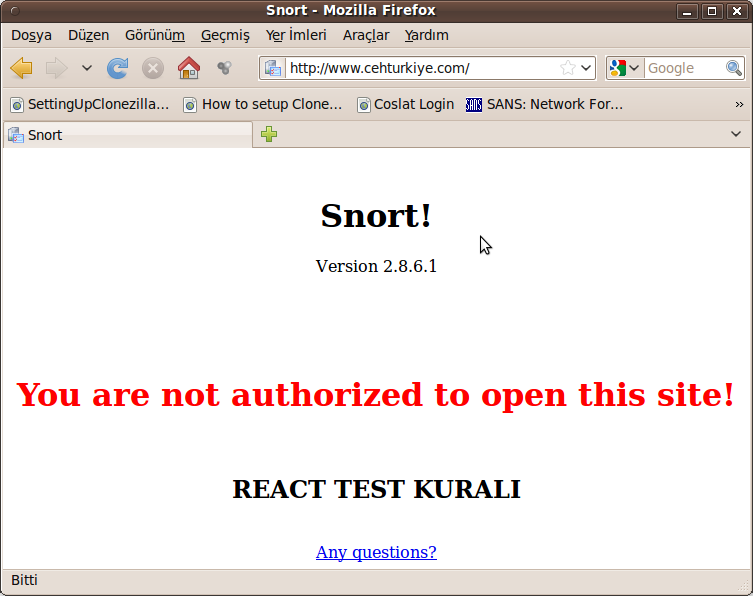
Phil Woods tarafından eklemeler yapılmış libpcap sürümünü indirip kurmak için http://public.lanl.gov/cpw/
tar zxf libpcap-0.9.8.20081128.tar.gz -C /tmp/
cd /tmp/libpcap-0.9.8.20081128/
sudo ./bootstrap
sudo automake
Şimdi çalıştıralım
sudo PCAP_FRAMES=”max snort -i eth0 -c /etc/snort.conf
–== Initialization Complete ==–
,,_ -*> Snort! <*-
o” )~ Version 2.8.6.1 (Build 39) inline
”” By Martin Roesch & The Snort Team: http://www.snort.org/snort/snort-team
Copyright (C) 1998-2010 Sourcefire, Inc., et al.
Using PCRE version: 7.8 2008-09-05
Rules Engine: SF_SNORT_DETECTION_ENGINE Version 1.12 <Build 18>
Preprocessor Object: SF_SDF Version 1.1 <Build 1>
Preprocessor Object: SF_DNS Version 1.1 <Build 4>
Preprocessor Object: SF_FTPTELNET Version 1.2 <Build 13>
Preprocessor Object: SF_SSLPP Version 1.1 <Build 4>
Preprocessor Object: SF_SSH Version 1.1 <Build 3>
Preprocessor Object: SF_DCERPC Version 1.1 <Build 5>
Preprocessor Object: SF_DCERPC2 Version 1.0 <Build 3>
Preprocessor Object: SF_SMTP Version 1.1 <Build 9>
Using PCAP_FRAMES = ”max